
LearnHub
Welcome to the myVisBiz Learnhub
Getting Started
Welcome to Your myVisBiz WebHub Client Portal We’re excited to have you on board! The webhub portal is your personalized workspace designed to keep everything organized and accessible throughout our web design process. Here, you’ll find tools like your own to-do list, calendar, notes, and a file uploader to streamline collaboration. You can easily communicate with your designer during content development, submit support tickets, and find copies of your proposal, design agreement, invoices, and payment history, all in one place. We want to make this process as easy as possible, and we will be here each step of the way.
(3) IMPORTANT FIRST STEPS
Step-1:
Bookmark your WebHub Link
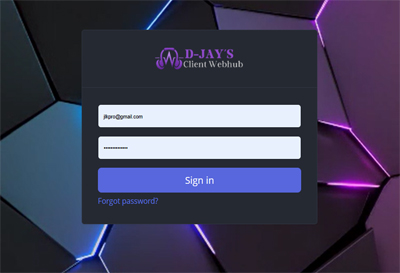
You can access your WebHub by clicking the link below. Bookmark your Login Page. Then Login.
https://webhub.myvisbiz.com
Step-2:
Reset Your Password
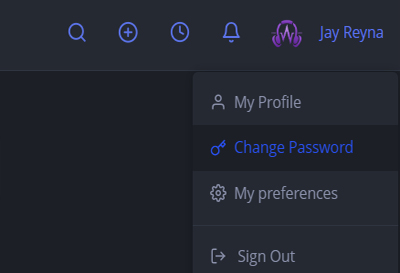
Click your name in the top right corner and select CHANGE PASSWORD. Enter new password to login with and click SAVE.
Step-3:
START HERE
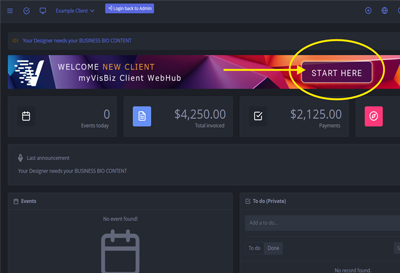
After changing your password, click the START HERE button to learn how to use your new client portal during the web design process.

Next Steps…
Your designer will supply you with temporary login credentials for your Client Portal. Be sure to update your passwords and keep a secure record of them for future access.
This training is designed to be immersive and interactive. We will guide you through each step. You can use the client webhub to organize your tasks, notes and content files. You can also view proposals, contracts, invoices and payment history.
Make sure to watch the video below for a short tutorial on how to use the client webhub. Feel free to reach out with questions at any time.
Your designer will contact you for information to get your hosting account set up, your domain pointed to our servers, and activate your landing page. You can view all content requests in your webhub. We require all content be completed and uploaded to your portal before we can begin design work on the website. You can upload text files in PDF or WORD format to the portal. Your designer will send you an image upload link for any images that will be used on your website. We need all images to be uploaded in high resolution format. Please avoid using screenshots and upload original images if possible.
WATCH THIS FIRST
Video Tutorial - Click Play and Follow Along
Step-by-Step Design Process
Below is an outline for the Design Process with myVisBiz.
STEP-1
Proposal Acceptance
Review and accept your design proposal.
STEP-2
Contract Acceptance
Review and accept the Design Agreement.
STEP-3
Deposit Payment
Pay first billing for DEPOSIT
Step-4
Set Password for WebHub
Login to your webhub portal and change your password.
STEP-5
Watch Intro Video
Watch the LEARNHUB quick intro video on how to use the myVisBiz WebHub Client Portal.
STEP-6
Content Creation and Development Phase
Work with your designer to develop your content.
STEP-7
Research and Discovery Phase
While you are gathering your content, your designer will be doing some general research and discovery preparation for your design.
Step-8
Design Development Phase
Once all of your content is submitted and your designer is done with research, we can begin design development. All you need to do during this part of the process, is be available to answer any questions your designer needs during development.
STEP-9
Sandbox Viewing
Once your designer is done building your website, you will be able to preview it in a sandbox (testing) installation. Here you can make note of any edits or revisions.
STEP-10
1st Edits and Revisions
Here you will submitany requested copy or design edits to your designer.
STEP-11
Second Viewing
Once your designer makes all the requested edits, you can view the website again and make note of any final edits.
Step-12
2nd Edits and Revisions
You can submit any final edits to your designer.
STEP-13
Website Approval
Once the final edits have been completed, your designer will send you an approval form.
STEP-14
Website Migration and Launch
Once you have approved your website design, we will migrate the files to your domain and launch your website LIVE.
STEP-15
Testing and Monitoring
Once your website is launched, we will monitor and test performance for three days to make sure that everything is operating as expected.
Step-16
Final Billing
You will need to pay the final billing within (14) days of launch to avoid any disruptions of service.
myVisBiz Can Also Help With:
WebDesign
Custom CMS Website Designs
CRM Systems
Client Relation Management Systems
Hosting
Hosting Accounts and Online Apps
Training
Systems Training and Tutorials
Graphics
Graphic Design & Marketing Materials
Need Help?
Send us a message so we can get someone to assist you.